Getting your data in
Verdemar doesn't connect to your broker or your bank yet. There are three ways to add your history instead, and after that it keeps itself up to date. Most of it can go through the document reader.
The main way in
The AI document reader
Drop in up to ten PDFs at once: contract notes from your broker, capital calls and distribution notices from a private fund, capital account statements, loan and mortgage statements. Verdemar reads them all in parallel and turns them into transactions, ready for you to check. Scanned documents work too.
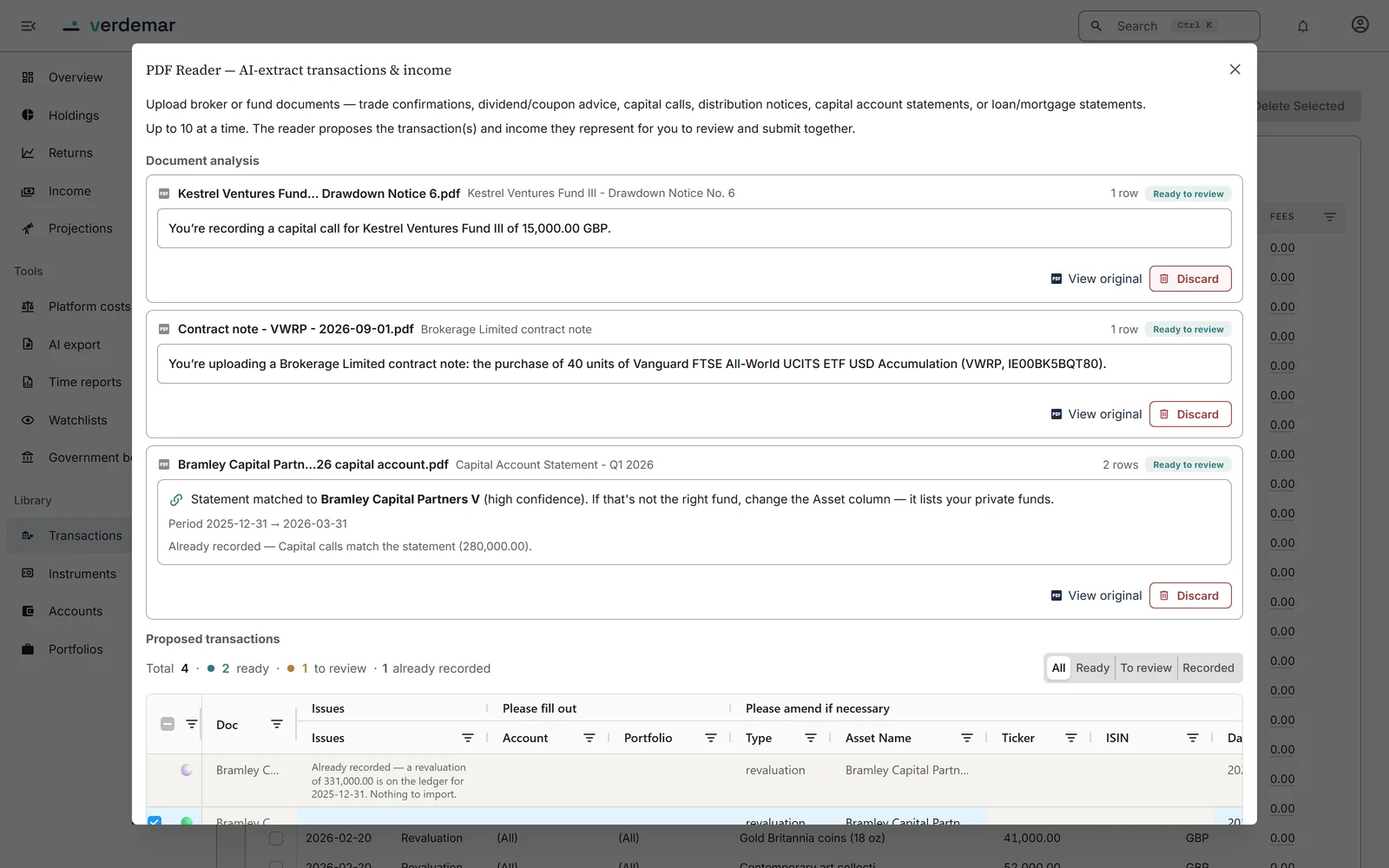
Swipe the screenshot sideways to read it
| Upload this | Verdemar does this |
|---|---|
| Contract note: shares, ETFs, funds | Proposes the buy or sell, with quantity, price, fees and account, and identifies the investment |
| Contract note: gilts and bonds | Proposes the trade with clean and dirty price and accrued interest broken out |
| Capital call | Proposes the call against the right fund, and sets up the fund if this is the first you've recorded |
| Distribution notice | Proposes the distribution as income from that fund |
| Capital account statement | Checks the statement against your records and proposes only what's missing: a new valuation, or a call or distribution you haven't recorded |
| Loan or mortgage statement | Corrects your recorded balance to match, and tells you if the rate, lender or term has changed |
It checks its own reading
A contract note prints quantity, price, consideration, fees and total, and those figures have to agree. Verdemar checks them against each other. If they don't add up, it reads the document again, pointing out what didn't match; anything still inconsistent is flagged for you.
It knows what you already hold
Each investment is identified by ISIN, then ticker, then name, and matched to your existing holdings. If a document looks like a trade you've already recorded, Verdemar tells you before you add it twice.
Statements reconcile, not duplicate
A capital account statement is compared with what you've already recorded. Figures that already match are shown and left alone; only the gaps are proposed. Differences it shouldn't fix on its own are listed, with a link to the entry.
Nothing is saved until you approve
Every proposal lands in one review table where you can correct any field. One click saves the lot, through the same checks as an entry typed by hand, and if any row fails, nothing is saved.
It tells you what it won't take
Dividend notices and gilt coupons are recognised as already tracked automatically. Fund quarterly reports, tax certificates and portfolio summaries are declined, with the reason.
What happens to the file
Documents are read by Google's Gemini on a paid plan, so they aren't used to train its models. If you accept its entries, Verdemar keeps the original for 12 months so you can go back to it; if you reject them, it is deleted straight away; if you never decide, it goes after 90 days. Documents it can't import aren't kept at all. More in the privacy policy.
The other ways in
CSV, by hand, and what happens after
CSV import
For years of past trades, paste or drag in a CSV. Every row is checked before anything is saved, and the files Verdemar exports can be imported again.
Typing it in
Any transaction can be added by hand: a buy, a sale, a capital call, a revaluation, a loan repayment. Listed investments are found by name or ticker.
After that, it keeps itself up to date
Every night Verdemar updates prices and exchange rates and adds dividends, share splits, gilt coupons, rent on property you let and interest on money you owe. What you add yourself is new activity, not upkeep.
Coming soon
Two more ways in
Email documents in
Email a contract note or a capital call straight to Verdemar as it arrives, and it will be waiting in the app, already read, for you to approve.
Broker connections
Automatic connections to the UK brokers that allow them, so new trades arrive without any paperwork.